Table of Contents
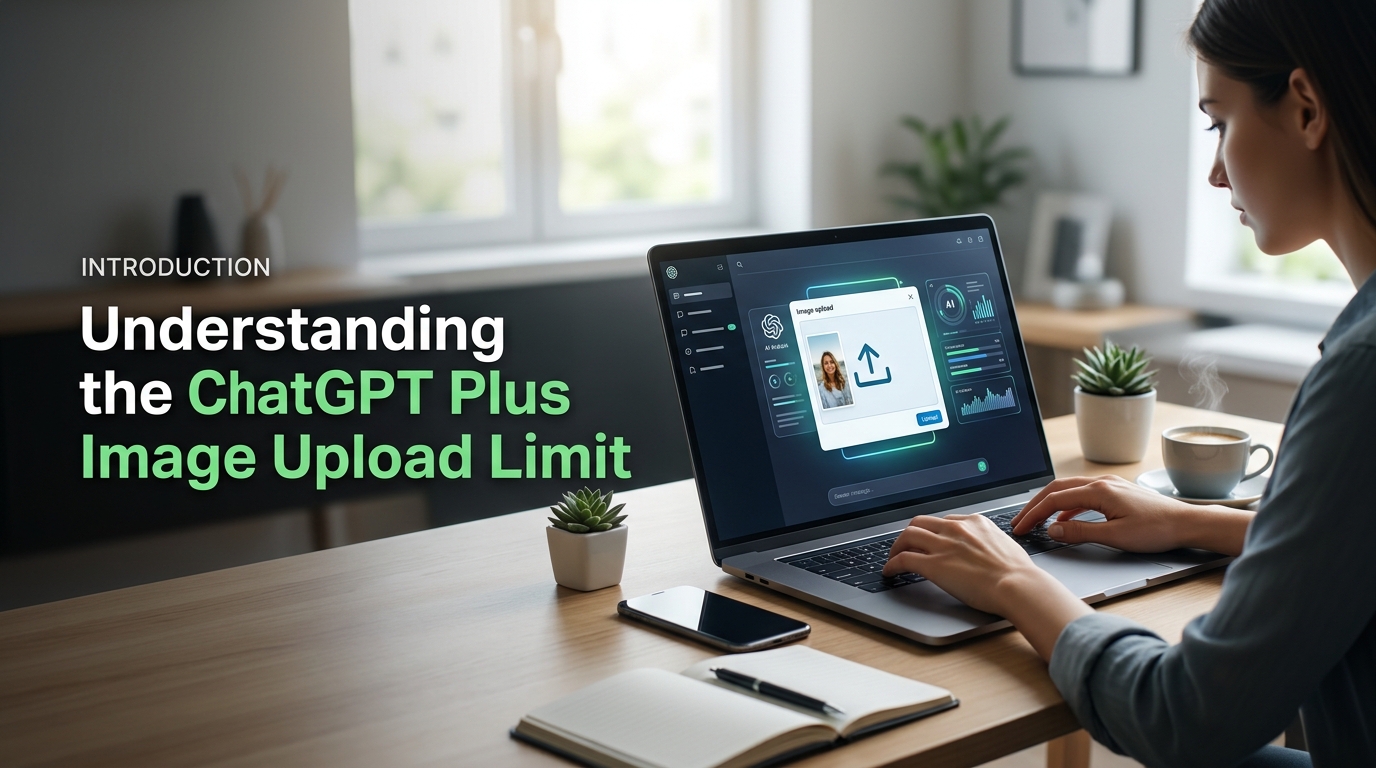
Image uploading to ChatGPT Plus is very easy for problem-solving and reading documents. But one thing that most ChatGPT Plus users are curious about is whether there is any daily limit to uploading images. Most of them also ask what will happen if that limit is reached. This is because the answer is not a fixed one. There are dynamic rate limits set by OpenAI which are subject to change from time to time. And this usually confuses ChatGPT Plus users. In this guide, we will see how ChatGPT Plus image upload limit works.
What Is the ChatGPT Plus Image Upload Limit?
The ChatGPT Plus image upload limit refers to the number of images Plus subscribers can upload within a specific period before temporary usage restrictions apply. Unlike a fixed daily quota, OpenAI manages image uploads using dynamic rate limits that depend on factors such as server demand, account activity, and the AI model you’re using. This means two users may not always experience the exact same upload capacity. Once you reach the limit, ChatGPT may temporarily prevent additional uploads until your allowance resets
Can ChatGPT Plus Upload Images?
Yes, ChatGPT Plus supports image uploads, allowing users to interact with the AI using photos, screenshots, scanned documents, diagrams, handwritten notes, and other visual content. After uploading an image, you can ask ChatGPT to explain charts, extract text, identify objects, summarize documents, solve visual problems, or answer questions based on the image. This feature is especially useful for students, professionals, researchers, designers, and content creators who frequently work with visual information. Although image uploads are included with the Plus subscription, they are still subject to usage limits. If you upload a large number of images in a short time, you may temporarily reach the ChatGPT Plus image upload limit until it resets.
How Image Uploads Work in ChatGPT Plus
Image uploads in ChatGPT Plus are processed by multimodal AI models that understand both text and visual content. When you upload a picture, the model analyzes its contents and combines that information with your written prompt to generate an accurate response. You can upload one or multiple images during a conversation, depending on your available usage allowance. The system may temporarily restrict uploads if you exceed the current limit, but access is typically restored automatically after the rate limit resets. Since OpenAI adjusts these limits based on system capacity and performance, the available number of uploads may vary over time instead of following a permanently fixed daily limit.
ChatGPT Plus Image Upload Limit Per Day
Many users ask about the ChatGPT Plus image upload limit per day, but there is no officially published daily number. OpenAI uses dynamic rate limits instead of fixed daily quotas. Your available uploads depend on the AI model, system traffic, and recent account activity. Some users can upload many images without issues, while others may reach temporary limits sooner. The same approach also applies to the ChatGPT Plus photo upload limit per day and the ChatGPT Plus picture upload limit per day. Because these limits change over time, your experience may vary from one day to another.
Is There a Fixed Daily Upload Limit?
No, OpenAI has not announced a fixed daily upload limit for ChatGPT Plus users. Instead, the platform uses flexible rate limits that automatically adjust based on demand. This means you may upload more images during quiet periods and fewer during peak hours. The system balances performance for all users by managing available resources. As a result, there is no guaranteed number of image uploads every day. Rather than counting daily uploads, ChatGPT monitors your recent usage and temporarily limits uploads only when necessary.
Factors That Affect Your Image Upload Limit
Several factors determine how many images you can upload before reaching a limit. The AI model you select plays an important role. Server demand also affects available capacity. Heavy usage within a short period may reduce your remaining uploads. Large image files or multiple uploads in one conversation can also impact your allowance. OpenAI may update these limits to improve performance and reliability. Because of these changing conditions, two Plus users may experience different upload limits at the same time.
What Happens If You Reach the Limit?
If you reach the image upload limit, ChatGPT temporarily blocks additional image uploads. You may see a message explaining that your usage limit has been reached. Existing conversations remain available, and text chats usually continue without problems. In most cases, you only need to wait until the usage window resets. After the reset, image uploads become available again automatically. There is usually no need to contact support or upgrade your subscription. Waiting for the limit to refresh is the simplest solution for most users.
ChatGPT Plus Plan Image Upload Limit Explained
The ChatGPT Plus plan image upload limit is higher than the free plan, but it is not unlimited. Plus subscribers receive greater access to advanced AI models and image features. However, OpenAI still applies dynamic rate limits to maintain system performance. The exact number of uploads is not publicly disclosed. Instead, your available uploads depend on server load, recent usage, and the model you choose. These limits may change without notice. Most users rarely reach the limit during normal use. Heavy users, however, may experience temporary restrictions after uploading many images within a short period.
Does the Plus Plan Offer Higher Limits?
Yes, the ChatGPT Plus plan generally offers higher image upload limits than the free plan. Plus users can upload more images before reaching a temporary restriction. They also receive priority access during busy periods. This improves the overall experience for users who work with documents, screenshots, and photos regularly. Even so, the Plus subscription does not provide unlimited uploads. OpenAI adjusts usage limits based on system demand and available resources. Therefore, your upload allowance may vary over time. Higher limits make Plus suitable for frequent users, but reasonable usage policies still apply.
Image Upload vs Image Generation Limits
Image uploads and image generation use different usage limits in ChatGPT Plus. Uploading an image means sending an existing photo or document for analysis. Image generation creates a brand new image from your text prompt. These features rely on different system resources and may have separate rate limits. You can reach the upload limit without affecting image generation. Likewise, generating many AI images does not always reduce your upload allowance. Understanding this difference helps you avoid confusion. It also explains why one feature may work while the other is temporarily unavailable.
ChatGPT Go vs Plus Image Upload Limit
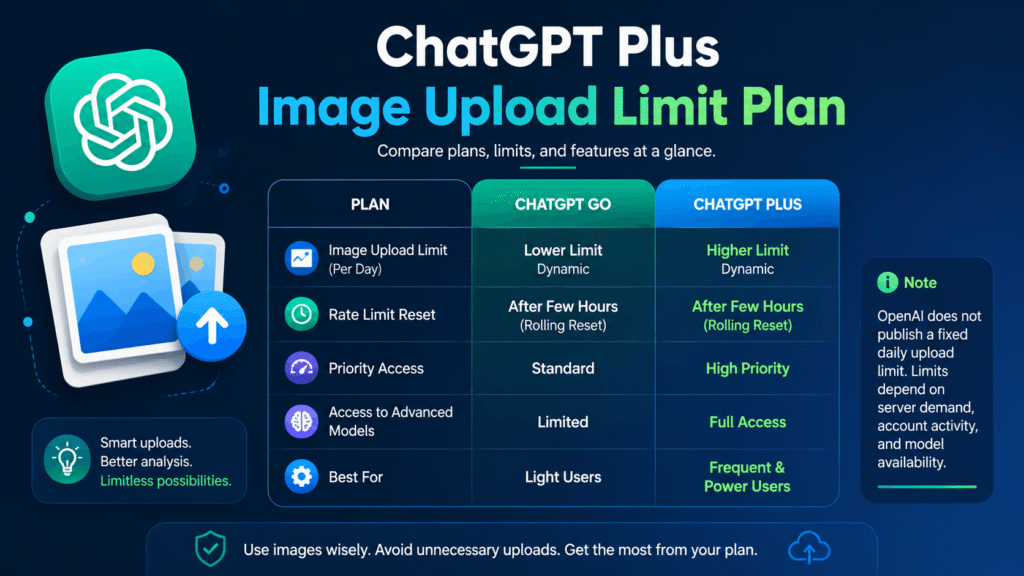
The ChatGPT Go vs Plus image upload limit is a common comparison among users. Both plans support image-related features, but they do not offer the same usage limits or benefits. ChatGPT Plus generally provides higher usage allowances and better access to advanced AI models. ChatGPT Go is designed as a lower-cost option in supported regions. It offers fewer resources than Plus. OpenAI does not publish exact upload numbers for either plan. Instead, both plans use dynamic rate limits that change with system demand. Users who upload images frequently usually receive a better experience with the Plus subscription.
Feature Comparison
ChatGPT Go and ChatGPT Plus share several core AI features. However, their usage limits and performance are different. Plus users receive greater access to advanced models and higher image usage allowances. They also experience fewer interruptions during busy periods. ChatGPT Go offers essential AI features at a lower price. However, it may provide lower usage limits than Plus. Both plans use dynamic rate limits instead of fixed daily quotas. Because of this system, the exact number of image uploads can change over time. Your available uploads depend on demand, account activity, and the selected AI model.
Which Plan Is Better for Frequent Image Uploads?
ChatGPT Plus is the better choice for users who upload images regularly. It offers higher usage limits and more consistent access to advanced AI features. Students, researchers, designers, and professionals often benefit from the extra capacity. ChatGPT Go works well for light or occasional image uploads. It is suitable for users with basic AI needs and a smaller budget. However, heavy users may reach temporary limits more quickly. If image analysis is part of your daily workflow, the Plus plan provides a smoother and more reliable experience than the Go plan.
Tips to Avoid Reaching the ChatGPT Plus Image Upload Limit
You can reduce the chances of hitting the ChatGPT Plus image upload limit with a few simple habits. Plan your uploads before starting a session. Avoid sending duplicate images or unnecessary files. Combine related questions into one conversation whenever possible. Upload only clear and relevant images that the AI can understand easily. This approach saves your available uploads and improves response quality. If you work with many images every day, spread your uploads throughout the day instead of sending everything at once. These simple practices help you use your available image allowance more efficiently.
Upload Images More Efficiently
Upload only images that are necessary for your task. Crop screenshots to include only the important information. Remove blank spaces and unnecessary details before uploading. If several questions relate to one image, ask them in the same conversation. This reduces the need for repeated uploads. Clear and high-quality images also help ChatGPT understand your request faster. Better image quality often leads to more accurate responses. Efficient uploads save your available usage and reduce the chance of reaching temporary limits during important work.
Reduce Unnecessary Uploads
Avoid uploading the same image multiple times unless it has changed. Continue using the existing conversation when discussing the same file. Instead of sending new screenshots, ask follow-up questions about the previous image. This keeps your workflow organized and saves image uploads. Delete duplicate files from your device to avoid mistakes. If your question can be answered with text alone, skip the image upload. Small changes like these help preserve your available image allowance. They also make your conversations cleaner and easier to manage.
Best Practices for Heavy Users
Heavy users should create a workflow that minimizes unnecessary uploads. Group similar tasks into one chat whenever possible. Upload documents only after checking that they contain the correct information. Keep important images organized in folders for quick access. Avoid testing multiple versions of the same image without a clear purpose. If you notice slower performance, wait before uploading more files. This gives the system time to refresh your available usage. Smart upload habits improve productivity and reduce interruptions caused by temporary image upload limits.
How many images can I upload to ChatGPT Plus per day?
OpenAI does not publish a fixed daily image upload limit. ChatGPT Plus uses dynamic rate limits that depend on server demand, account activity, and the AI model you use.
Does ChatGPT Plus Have an Image Upload Limit?
Yes. ChatGPT Plus has an image upload limit, but it is not a fixed daily quota. OpenAI adjusts the limit automatically to maintain system performance and ensure fair access.
Why Can’t I Upload More Images?
You have likely reached your current usage limit. Wait until the rate limit resets, then try uploading again. Temporary server issues can also affect image uploads.